Multi-Node Installation
The following binaries must be present on the machine with access to Kubernetes api before starting the installation:
- kubectl -
v1.27 - helm -
v3.9
Low-Ops requires a Kubernetes cluster. The minimum version is v1.27.
To run the Low-Ops you'll need at least
- 16 GB RAM
- 8 core CPU
Foundation
The platform foundation is an infrastructure level that has to provide a scalable, flexable and extensible environment for the platform lifecycle. To build the platform foundation, you can use cloud providers or on-premise solutions that allow you to run managed or self-managed Kubernetes (k8s) clusters.
There are 2 different platform foundation_types's:
generic - Default platform installation method supports any Kubernetes custom or managed solution. All platform
components required to run future applications workloads will be installed automatically.
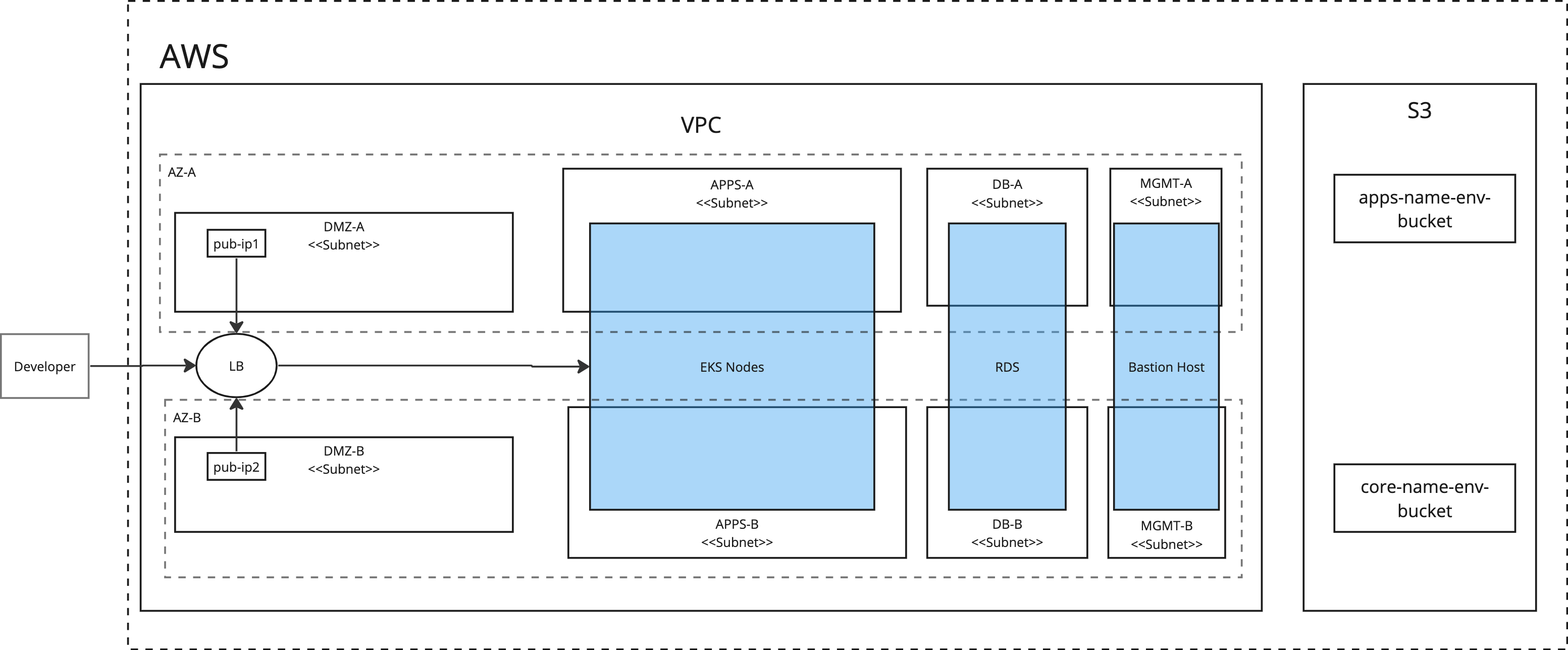
aws - Optimized platform installation for AWS-specific services natively supports other AWS services such as EKS, RDS,
S3, ELB, EBS. To use AWS-managed data resources, you need to create them before platform installation as part of the
foundation setup. Refer to the diagram bellow for more details.
Configuration
Before starting the platform installation process, check the configuration options below. Change required paramaters to match your environment setup.
Create values file values.yaml with following parameters:
lowops:
  image:
    containerImage: registry.gitlab.com/cinaq/low-ops-platform/ansible-roles:0-ci-v3-2-4

  # LowOps platfrom configuration variables
  config:
    common:
      base_domain: ci.cinaq.com
      platform_state: present
      foundation_type: generic # supported values: generic, aws, azure
      email_domain: cinaq.com
      general_client_name: CINAQ
      platform_version: v3.2.4
      low_ops_env: prod # set low-ops-env variable can't be ci,dev,trial - reserved
      enable_letsencrypt: "true"
      enable_nginx_proxy_protocol: "true" # required when running on generic foundation with haproxy
Refer to the Advanced Configuration page for more details on the available configuration options.
Installation
Step 1. Configure Namespace
Run script below to create deployment job namespace. Add pull secret to the namespace
NAMESPACE=lowops-devops
kubectl create namespace "$NAMESPACE"

UPSTREAM_REGISTRY="registry.gitlab.com"
UPSTREAM_REGISTRY_USER="registry-user" # change with your resgitry user
UPSTREAM_REGISTRY_TOKEN="registry-token" # change with your registry password
UPSTREAM_REGISTRY_AUTH=$(echo -n "$UPSTREAM_REGISTRY_USER:$UPSTREAM_REGISTRY_TOKEN" | base64)

mkdir -p /tmp/lowops-docker-config
echo "
{
    \"auths\": {
        \"$UPSTREAM_REGISTRY\": {\"auth\": \"$UPSTREAM_REGISTRY_AUTH\"}
    }
}
" > /tmp/lowops-docker-config/config.json

# ensure lowops-registry secret exists
kubectl -n "$NAMESPACE" create secret generic lowops-registry --from-file=.dockerconfigjson=/tmp/lowops-docker-config/config.json --type=kubernetes.io/dockerconfigjson
```bash
Step 2. Install metallb
Add bitnami helm repo
helm repo add "bitnami" "https://charts.bitnami.com/bitnami"
helm repo update
Install metallb chart
# Network pool must be accesseble from cluster.
START_NETWORK=172.20.255.200
END_NETWORK=172.20.255.250
helm upgrade -i -n metallb --create-namespace metallb bitnami/metallb \
    --version 3.0.12 \
    --set "configInline.address-pools[0].name=default" \
    --set "configInline.address-pools[0].protocol=layer2" \
    --set "configInline.address-pools[0].addresses[0]=${START_NETWORK}-${END_NETWORK}" \
    --set "speaker.secretValue=stronk-key"
Step 3. Install Low-Ops
From the deploy server with access to the Kubernetes cluster API. Install the platform by installing lowops helm
chart.
Add lowops helm repository
helm repo add --username $UPSTREAM_REGISTRY_USER --password $UPSTREAM_REGISTRY_TOKEN lowops \
    "https://gitlab.com/api/v4/projects/41532268/packages/helm/stable"

helm repo update
Run helm install command to start the Low-Ops setup process
NAMESPACE=lowops-devops
CHART_VALUES_FILE=values.yaml
CHART_VERSION=0.1.407
HELM_CMD="helm upgrade -i lowops-platform lowops/lowops -n $NAMESPACE"
if [ -f "$CHART_VALUES_FILE" ]; then
    HELM_CMD="$HELM_CMD -f $CHART_VALUES_FILE"
fi
if [ -n "$CHART_VERSION" ]; then
    HELM_CMD="$HELM_CMD --version=$CHART_VERSION"
fi
echo "$HELM_CMD"
eval "$HELM_CMD"
After deploy job started you can get installation log by running:
kubectl logs -n lowops-devops --timestamps=true job/lowops-platform -f
After deploy finished successfully start with exploring LowOps platform portal. In browser access
https://portal.ci.cinaq.com (where ci.cinaq.com is your base domain.)